Work
Meeting minutes without the note-taking.
If you're typing, you're only half listening. Here's how to capture decisions and action items and still stay in the conversation.
- Good meeting notes capture three things: what was decided, who does what by when, and what is still open.
- Ask everyone before you record, and say decisions out loud with a name and a date.
- Check the notes quickly and send them the same day, while everyone still remembers.
When you take notes in a meeting, you're only half listening, and you often miss the one sentence that mattered. Here's what belongs in meeting minutes, how to get them almost for free with a recording, and what to watch out for.
What belongs in meeting minutes
Meeting minutes are not a transcript. Nobody will go back to see who said what in which order. What people need are the outcomes: decisions, action items and open questions. Everything else can be short.
| Part | What goes in |
|---|---|
| Header | Date, topic, attendees |
| In short | The outcome in two or three sentences |
| Decisions | Each decision with a short reason |
| Next steps | Task, owner, due date |
| Open questions | What is open and who follows up |
Notes like these, focused on outcomes, cover most meetings. You only need a detailed record of the discussion when people later have to follow how a decision was reached, for example in a formal board meeting.
Before the meeting: ask and prepare
Decide in advance what you'll talk about. A short agenda gives your notes their structure, and every item gets its outcome later. If you want to record the conversation, ask everyone at the start whether that's okay.
During the meeting: listen, don't type
With the recording running, you can give the conversation your full attention. Jot down a keyword at most, if something feels especially important. What helps far more is how outcomes are said out loud.
Let's do that.Later, nobody knows what was actually decided or who owns it.
We launch on March 1, and Lena sends the timeline by Friday.Decision, owner and date in one sentence, so they end up in the notes too.
At the end of each agenda item, sum up in one sentence what was decided. It helps everyone in the room, and open questions surface while people are still there to answer them.
How Hazelnote writes the minutes
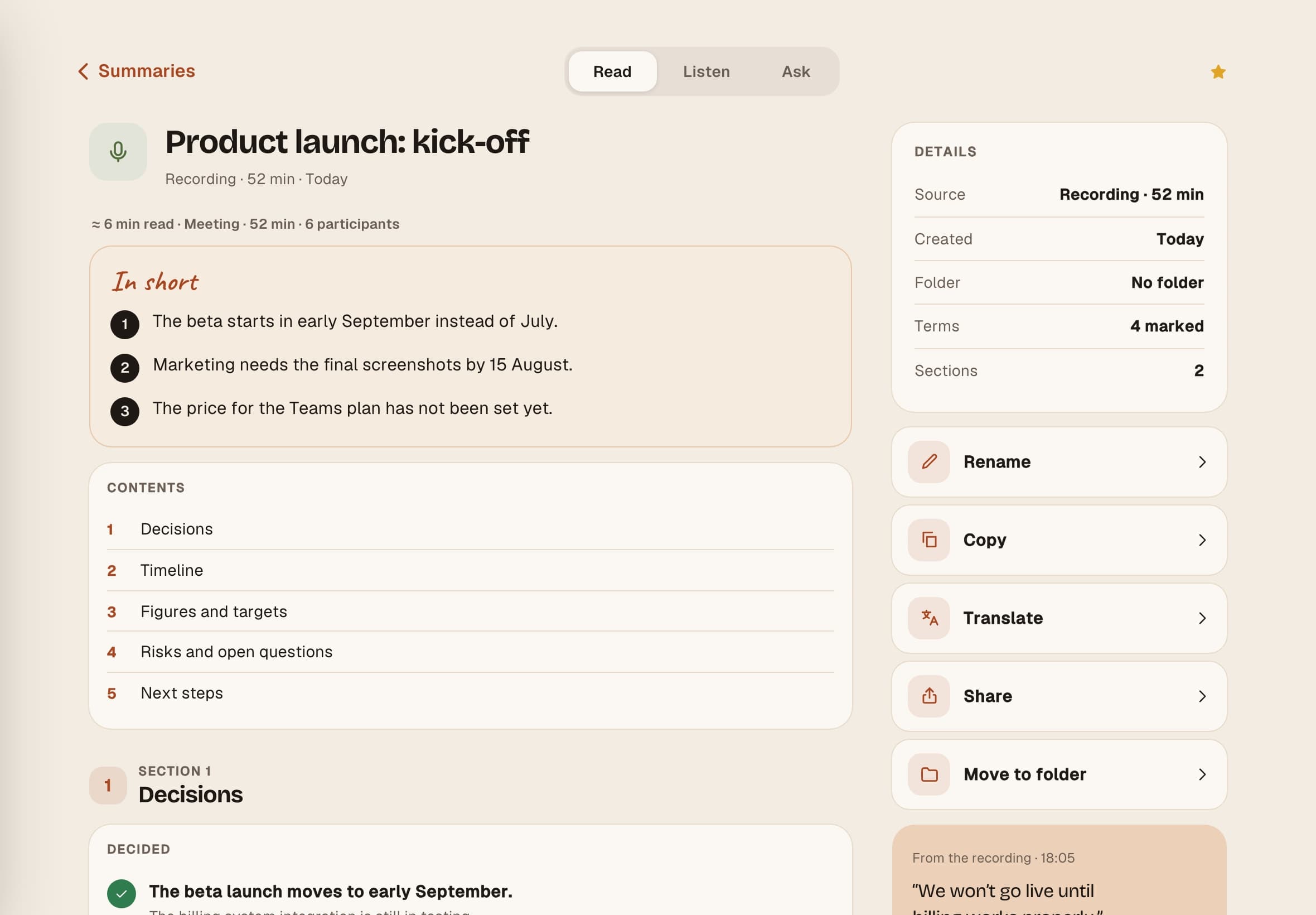
Hazelnote records the conversation and turns it into an organized summary. Here's how:
- Start recordingIn Summaries, tap New summary and choose Live recording. Recording starts right away.
- Add photosTap the camera to snap the whiteboard or slides. The pictures show up in the summary at the moment you took them.
- StopTap the stop button. Hazelnote writes the summary from here, there's nothing else you need to do.
Keep the app open while you record, and the screen stays on. A phone call pauses the recording, and you tap Resume afterward. A live recording runs for up to 45 minutes, so for longer meetings you simply start a new one.
The summary opens with In short, followed by its sections. For meetings, blocks like Decided, Next steps and Open questions are added where they fit. Hazelnote only lists names that come up in the conversation, and it writes in the language you spoke.
After the meeting: check and share
Read the summary once before you send it. AI can get things wrong, especially names, numbers and jargon. So double-check the action items and dates other people will rely on.

Use Share or Copy to send the notes to your team, ideally the same day. If someone remembers something differently, they'll speak up while everyone still knows what it was about.
Your checklist for the next meeting
- Prepare a short agenda with the key items
- Ask everyone at the start if you may record
- Say decisions out loud with a name and a date
- Read the summary and check the action items
- Send the notes the same day
Common questions
The bottom line
Good meeting minutes don't need every word, they need clear outcomes. Ask before you record, say decisions clearly and share the summary soon after. With a recording running, you stay in the conversation instead of typing along.